
Exto

The Operational Readiness Platform

Purpose-built for commissioning, quality, and handover on complex capital projects. Exto replaces spreadsheets and siloed tools with one governed system of record.

Four modules. One system of record.

From first asset installation to final handover โ€” every workflow, every inspection, every approval lives in one governed system.

01
Commissioning Management
Define systems, track equipment, manage punch lists, and enforce completion sequences โ€” all from a single platform that replaces spreadsheets and siloed tools.
02
Quality Assurance
Structured inspection workflows with digital checklists, photo evidence capture, non-conformance tracking, and automated approval routing across disciplines.
03
Safety & Compliance
Enforce safety protocols at the task level โ€” LOTO verification, permit-to-work integration, incident tracking, and real-time compliance dashboards for every contractor.
04
Turnover & Handover
Auto-generate turnover packages with linked test records, as-built documents, and O&M manuals โ€” ready for direct import into Maximo, SAP PM, or your CMMS.

From checklists to schedule,
every step connected

Digitize paper checklists, define reusable step sequences, and sync with your master schedule — all enforced by rules-driven logic.
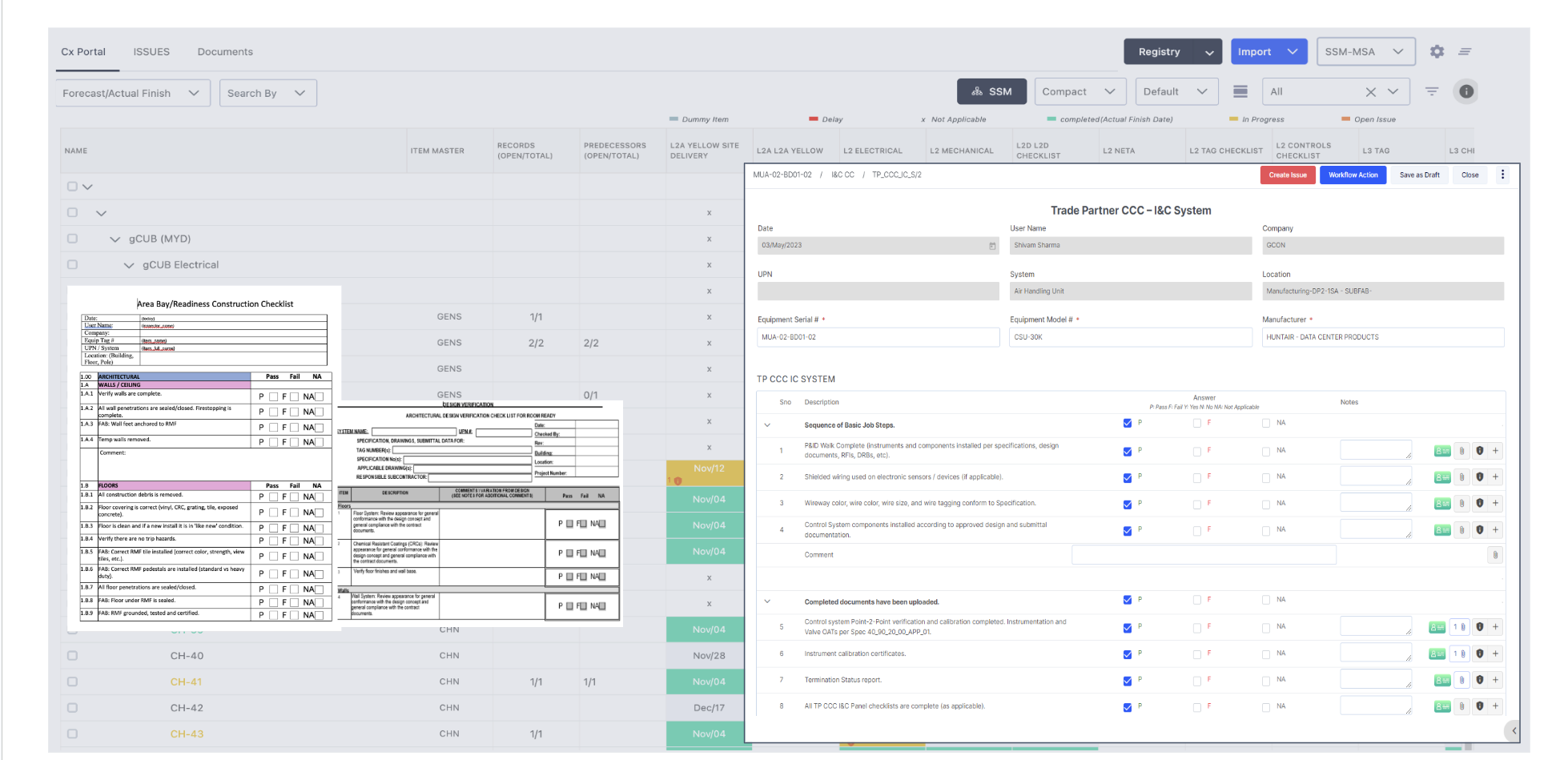
Exto Checklist Digitization — paper checklists converted to digital forms with Trade Partner CCC, I&C System checklist, and Pass/Fail workflow

Checklist Digitization

Replace paper checklists and static PDFs with logic-driven, workflow-enabled digital forms — tied directly to assets and commissioning steps.

  • Convert existing paper checklists into digital templates
  • Pass/Fail/NA answers with photos, notes, and attachments
  • Logic-driven forms with workflow approvals and audit trails
  • Standardize using shared templates across all projects
  • Automatically create issues from failed inspection items
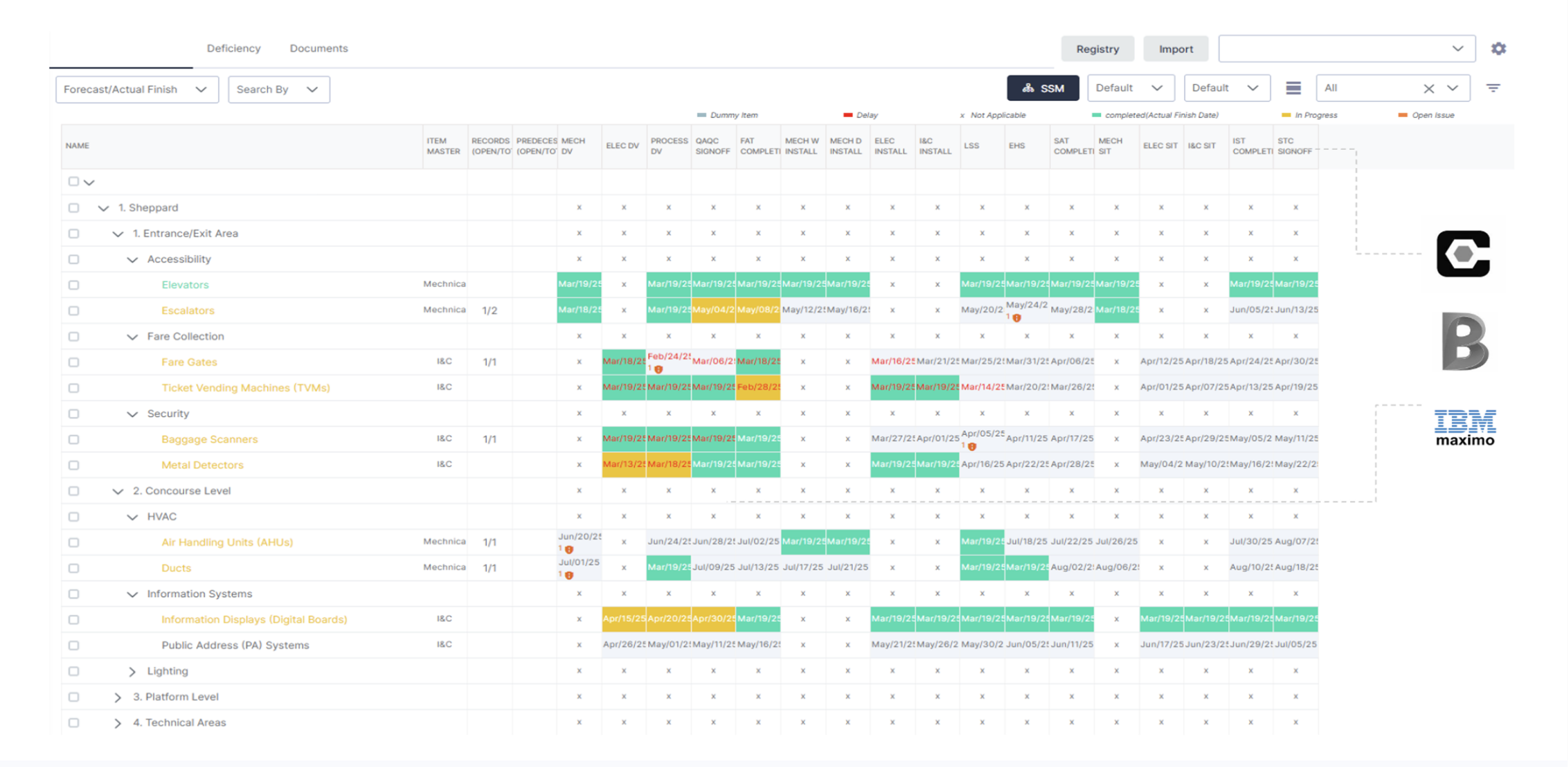
Exto 6 Dimensions Grid — Cx Portal showing equipment hierarchy with commissioning steps, integrated with Procore, BIM 360, and IBM Maximo

The 6 Dimensions in a Single Pane of Glass

Everything that determines whether a site is truly ready to operate — assets, sequences, checklists, schedules, issues, and integrations — unified in one live view.

  • Color-coded status at a glance: completed, in progress, delayed, N/A
  • Integrated with Procore, Autodesk BIM 360, and IBM Maximo
  • Hierarchical view by geography, system, or asset class
  • Every commissioning step tracked from DV through STC signoff
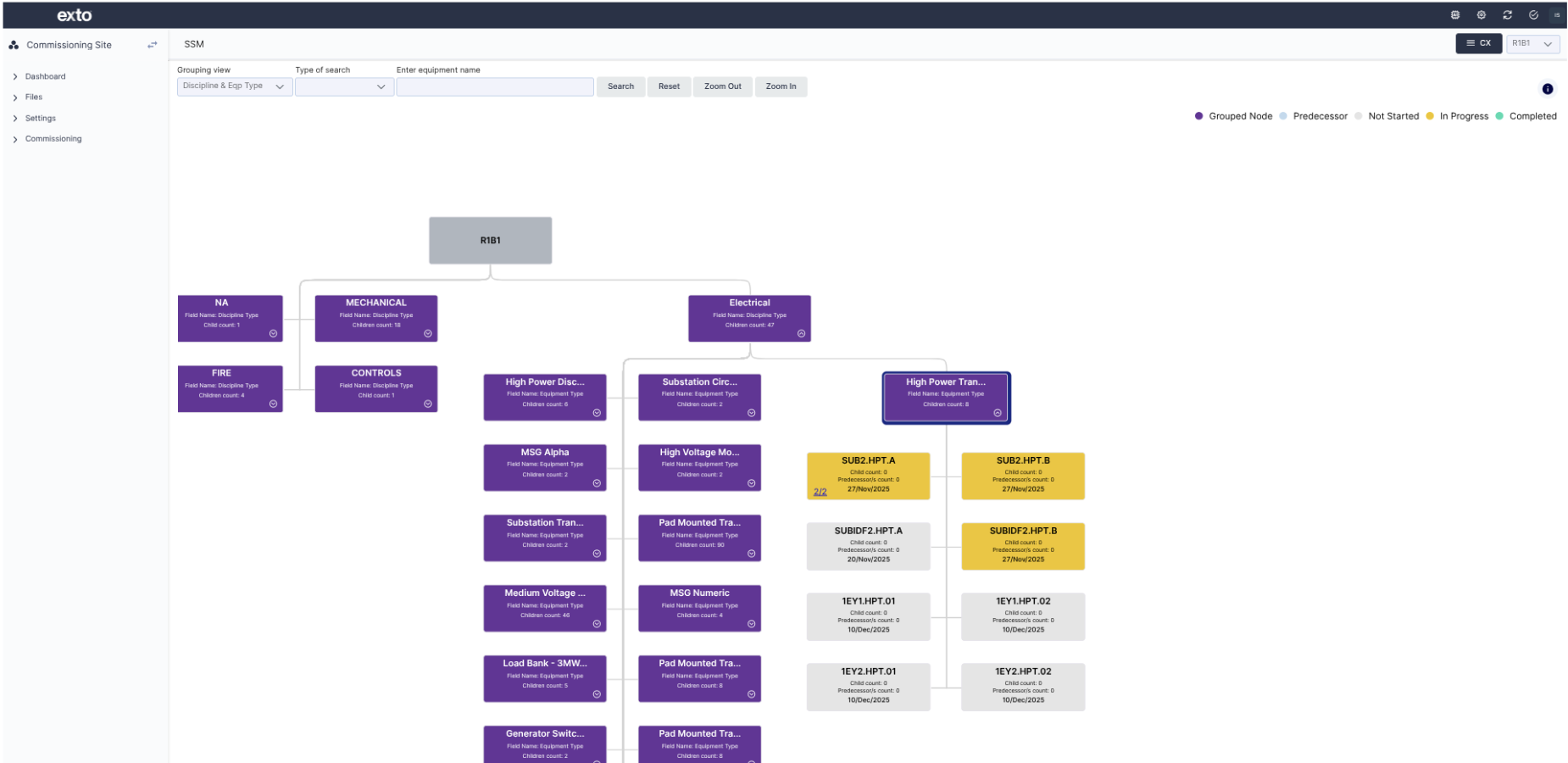
Exto Site Startup Matrix (SSM) — graphical tree view showing disciplines, equipment types, and individual assets with color-coded completion statuses

Site Startup Matrix (SSM) View

A graphical bird's-eye view of assets, issues, quality, and dates that need to be monitored to startup a mission-critical site. Group by multiple views to see the true startup sequence.

  • Shows direct predecessors and relationships between assets
  • Configurable to show descendants, searchable by equipment tag
  • Color-coded statuses: Not Started, In Progress, Completed, with open issue indicators
  • Group by Discipline & Equipment Type, Area, or System

Core capabilities that make operational readiness enforceable.

Each capability is purpose-built to close gaps that scheduling tools, document systems, and spreadsheets leave wide open.

๐Ÿ“‹
01
Single System of Record
One platform for commissioning, quality, safety, and handover โ€” eliminating data silos across contractors and disciplines
๐Ÿ—๏ธ
02
Asset-Centric Data Model
Every workflow begins at the equipment level โ€” tracking hierarchies, dependencies, and readiness from install to handover
โš™๏ธ
03
Rules-Based Execution Engine
Enforceable digital logic replaces tribal knowledge โ€” automated validation, prerequisite checks, and sequencing controls
๐Ÿ‘ฅ
04
Multi-Enterprise Access Control
Attribute-based access scales across owners, GCs, and 500+ subs without friction or IT overhead
๐Ÿ”ง
05
No-Code Configuration
150+ prebuilt templates, 50+ field types, drag-and-drop form builder. 90% of customization through configuration, not development
๐Ÿ“Š
06
Structured Handover to Operations
Turnover packages generated automatically โ€” integrated with Maximo, SAP PM, and your CMMS for seamless transition

HOW EXTO WORKS - An integrated and unified platform

Enables
collaboration
Owner
← — →
General
Contractor
← — →
Specialty
Contractors
Securely stored in the cloud
Automate
processes,

checklists,
forms
and more
Operational Readiness Platform for Quality, Commissioning, Safety & Handover
Most used features
Process Builder & Workflow
Integration, Analysis & Notifications
Forms & Workflow Management
Micro Schedule
Project Controls Integrated Processes
Issues & Risks
Checklists
Punch Lists
Docs & Photos Management
Process Rules Engine
Automated Handover & Closeout
EHS & Quality
Drawing Viewer & Markup
Site Startup Matrix
Integrated Schedule & Cx Process
Equipment Completion Analysis
Checklist & Process Data Analysis
exto
Standard Templates
Unlimited Extensibility
Online & Offline Checklists
Action Items & Minutes
Notifications of Updates
Scheduled Reports SMS
Easy to integrate
P6
Oracle P6
C
Procore
AUTO
Autodesk
Construction Cloud
P
X
Power BI
Excel
Any other software with open APIs

Exto sits at the center of your technology ecosystem.

Exto connects to the tools your teams already use โ€” scheduling, asset management, document control, and business intelligence โ€” through pre-built connectors and an open API.

Maximo
SAP PM
Procore
Primavera P6
Microsoft Project
Power BI
SharePoint
Azure AD / SSO
Autodesk BIM 360
Aconex
Open REST API

We're here to help and answer your questions.

Get your project ready for startup.

Call Center

+1 (844) 987 4232

Our Location

USA
4030 Moorpark Avenue, Suite #108
San Jose, CA 95117

Email

sales@exto360.com

ยฉExto 2026. All rights reserved.

Terms of use Privacy Environmental Policy

Download Case Study

Get the full case study with detailed outcomes, implementation insights, and ROI analysis.

Your case study is ready!

Click below to download. We’ve also sent a copy to your email.

Download PDF